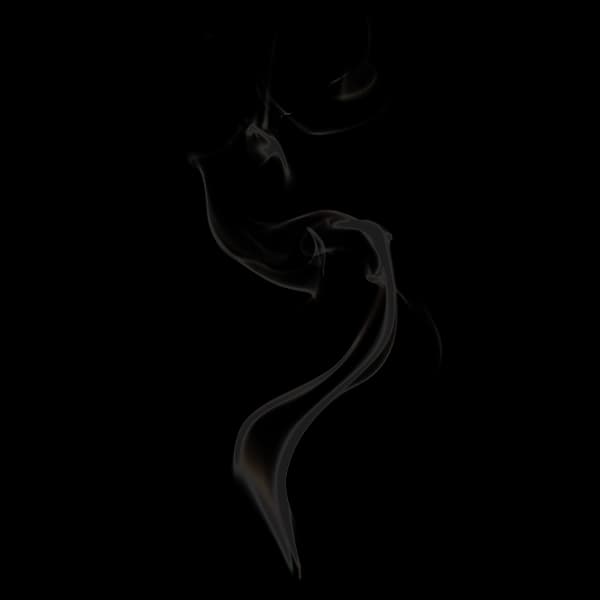
First we render a three.js scene with a plane geometry wrapped in shader material:
const material = new THREE.ShaderMaterial({vertexShader: `void main() {// Final positiongl_Position = projectionMatrix * modelViewMatrix * vec4(position, 1.0);}`,fragmentShader: `void main() {// Final colorgl_FragColor = vec4(0.0, 1.0, 0.0, 1.0);#include <tonemapping_fragment>#include <colorspace_fragment>}`,side: THREE.DoubleSide,wireframe: config.material.wireframe});
Perlin noise will provide the random values needed for the effect. We load a Perlin noise texture and pass it into the fragment shader.
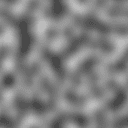
const textureLoader = new THREE.TextureLoader();const texture = textureLoader.load(config.material.textureURL);const material = new THREE.ShaderMaterial({uniforms: {uTexture: new THREE.Uniform(texture),},fragmentShader: `uniform sampler2D uTexture;...`,...});
To sample the texture, we need the UV coords of each fragment. We can pass the coords from the vertex to the fragment shader using a varying. To confirm it's working, we use the UVs as the fragment's red and green value — resulting in a green-red gradient. To see the effect, set state: uv in the controls.
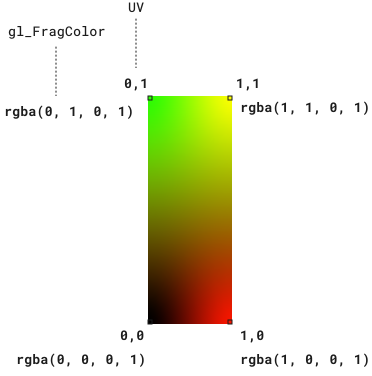
const material = new THREE.ShaderMaterial({vertexShader: `varying vec2 vUv;void main() {// Final positiongl_Position = projectionMatrix * modelViewMatrix * vec4(position, 1.0);// VaryingsvUv = uv;}`,fragmentShader: `varying vec2 vUv;void main() {vec2 textureUv = vUv;gl_FragColor = vec4(vUv, 0.0, 1.0);...}`,});
To map the texture onto the material, we use texture(uTexture, textureUv).r;.
It reads the texture's color value at the given coordinates using the same coordinate space as the fragment shader:
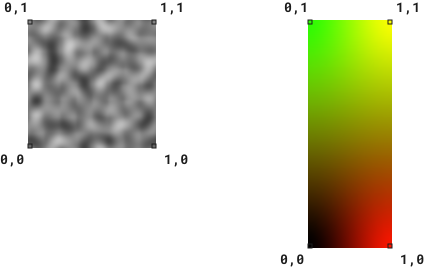
Passing the current fragment's UV coordinates to texture() lets us map the texture onto the material pixel by pixel.
The function returns a normalized RGBA value. Since the texture is grayscale, all three color channels are equal, so we only need the red channel (.r).
We then assign it to the fragment's color:
fragmentShader: `uniform sampler2D uTexture;varying vec2 vUv;void main() {vec2 textureUv = vUv;// Texturefloat textureImpl = texture(uTexture, textureUv).r;gl_FragColor = vec4(textureImpl, textureImpl, textureImpl, 1.0);...`
To see the effect, set state: texture in the controls (the texture stretches to fit the geometry).
We don't have to use the whole texture.
uTextureSampleWidth and uTextureSampleHeight is added to enable selecting only a portion of the texture.
fragmentShader: `uniform sampler2D uTexture;uniform float uTextureSampleWidth;uniform float uTextureSampleHeight;varying vec2 vUv;void main() {vec2 textureUv = vUv;// Set texture sample sizetextureUv.x *= uTextureSampleWidth;textureUv.y *= uTextureSampleHeight;// Texturefloat textureImpl = texture(uTexture, textureUv).r;gl_FragColor = vec4(textureImpl, textureImpl, textureImpl, 1.0);...`
Because smoke is translucent, we need to render the texture as a mask instead of an image. If we change the fragment's color to white and use the texture's color value for the alpha channel, it will render the texture as white with varying opacity instead of shades of gray.
1) renders a fully opaque white pixel.0) renders a fully transparent pixel.Because where varying opacity, we need to set transparent: true in the material.
To see the effect, set state: mask in the controls.
const material = new THREE.ShaderMaterial({fragmentShader: `...void main() {gl_FragColor = vec4(1.0, 1.0, 1.0, textureImpl);...}`,transparent: true,...});
To create a smoke rising animation, we set the texture to repeat itself vertically using:
texture.wrapT = THREE.RepeatWrapping;
The result is, when we translate the texture up, a copy of it will fill the space below.
We then pass the elapsed time into the shader to provide a continually increasing number and use it to continually lower the y-coord of the texture sample.
The creates the effect of the texture moving up.
uSpeed is added to control how fast this happens.
const texture = textureLoader.load(config.material.textureURL);texture.wrapT = THREE.RepeatWrapping;const material = new THREE.ShaderMaterial({uniforms: {uTime: new THREE.Uniform(0),uSpeed: new THREE.Uniform(config.material.speed)...},fragmentShader: `uniform float uTime;uniform float uSpeed;...void main() {// AnimatetextureUv.y -= uTime * uSpeed;// Texturefloat textureImpl = texture(uTexture, textureUv).r;...}`,...});const clock = new THREE.Clock();function onFrame() {const elapsedTime = clock.getElapsedTime();material.uniforms.uTime.value = elapsedTime;...
Currently, the effect isn't transparent enough to look like smoke. The texture has very few black pixels — most are gray — which makes the smoke appear solid. We can fix this by remapping the texture's color values using:
smoothstep(uRemapLow, uRemapHigh, textureImpl)
uRemapLow and uRemapHigh are values between 0 and 1.textureImpl is the texture's current pixel color value.The function works as follows:
textureImpl < uRemapLow, it returns 0 (black).textureImpl > uRemapHigh, it returns 1 (white).This allows us to turn dark grays into black and light grays into white while keeping a smooth transition between the two.
const material = new THREE.ShaderMaterial({uniforms: {uRemapLow: new THREE.Uniform(config.material.remap.low),uRemapHigh: new THREE.Uniform(config.material.remap.high)...},fragmentShader: `uniform float uRemapLow;uniform float uRemapHigh;...void main() {// Texturefloat textureImpl = texture(uTexture, textureUv).r;// RemaptextureImpl = smoothstep(uRemapLow, uRemapHigh, textureImpl);...}`,...});
Our smoke effect looks like wallpaper because the edges of the geometry are visible. We can fix this by fading out the texture near the edges using smoothstep. For example, for the left edge:
float fadeEdges = smoothstep(0.0, uEdgeX, vUv.x);
If we set uEdgeX = 0.4, it:
vUv.x = 0 (the very edge)vUv.x >= 0.4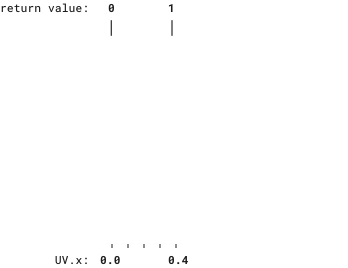
When this value is multiplied by the texture color value, it applies this additional level of opacity to the output:
const material = new THREE.ShaderMaterial({uniforms: {uEdgeX: new THREE.Uniform(config.material.edge.x),uEdgeY: new THREE.Uniform(config.material.edge.y)...},fragmentShader: `uniform float uEdgeX;uniform float uEdgeY;...void main() {// RemaptextureImpl = smoothstep(uRemapLow, uRemapHigh, textureImpl);// Edges// left edgefloat fadeEdges = smoothstep(0.0, uEdgeX, vUv.x);// right edgefadeEdges *= smoothstep(1.0, 1.0 - uEdgeX, vUv.x);// top edgefadeEdges *= smoothstep(0.0, uEdgeY, vUv.y);// bottom edgefadeEdges *= smoothstep(1.0, 1.0 - uEdgeY, vUv.y);textureImpl *= fadeEdges;...}`,...});
To improve the effect, we twist the geometry around the y-axis. Changing the geometry from a 2D plane to a 3D spiral. This requires modifying vertex positions, not color, so we'll modify the vertex shader.
For each vertical position on the plane (UV.y), we want a random angle of twist that gradually changes as we go from bottom to top.
We do this by sampling a 1px wide vertical slice of the texture.
uTwistSampleX is the x-position of the slice (it can be any value between 0 and 1) and is the same for every vertex.
uniform float uTwistSampleX;void main() {float textureY = uv.y;float textureValue = texture(uTexture, vec2(uTwistSampleX, textureY)).r;...
By taking advantage of the fact that the texture stretches to fit the geometry, we can control to how many twists there will be by changing the height of the slice. The taller the slice, the more values, the more variations:
uniform float uTwistSampleHeight;void main() {float textureY = uv.y * uTwistSampleHeight;...
To animate the twists, we use the same technique as before: use elapsed time to continually lower the sample y-coord — making the twists rise:
uniform float uTime;uniform float uTwistSpeed;void main() {float textureY = uv.y * uTwistSampleHeight - uTime * uTwistSpeed;...
Finally, to get the new position for each vertex, we multiple the random value by a strength value (to increase or decrease the amount of twist).
Then modify the x and z values (because we're twisting around the y-axis).
rotate2D will take these values and a desired angle and return the new, twisted x and z values:
const rotate2D = `vec2 rotate2D(vec2 value, float angle) {float s = sin(angle);float c = cos(angle);mat2 m = mat2(c, s, -s, c);return m * value;}`;...float angle = textureValue * uTwistStrength;vec3 twistedPosition = position;twistedPosition.xz = rotate2D(twistedPosition.xz, angle);
Occlusion is the concept of one object blocking another from view.
If object A is closer to the camera than object B, A occludes B — B should not be visible.
By default, three.js enables depth writing to handle occlusion.
However, because our shader is rendering semi-transparent, overlapping fragments, we need to disable this because we want to see through each layer of smoke.
To disable, we set depthWrite: false.
const material = new THREE.ShaderMaterial({depthWrite: false,...});
Have any feedback about this note or just want to comment on the state of the economy?