

Planted:
Tended:
Status: mature
Intended Audience: Creative coders, front-end developers with basic knowledge of three.js
An introduction to WebGL shaders. What they are, how they work, why they are valuable and how to use them in three.js.
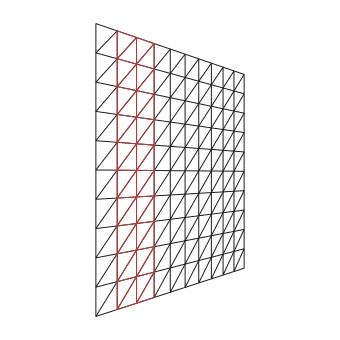
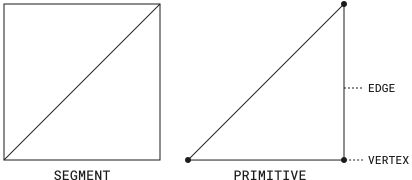
In three.js, objects like a cubes, spheres or planes are called meshes. A mesh is made of geometry, which defines the shape, and a material, which defines how the surface looks. The shape is a collection of vertices and triangles, the fundamental primitives processed by the GPU. For example, a plane geometry is subdivided into segments, where each segment consists of two triangles. Material defines how the geometry is rendered — including color, lighting, and surface detail. These are implemented using a shader.
// <planeWidth>, <planeHeight>, <widthSegmentCount>, <heightSegmentCount>const geometry = new THREE.PlaneGeometry(9, 9, 1, 1)const material = new THREE.MeshBasicMaterial({wireframe: true,})const mesh = new THREE.Mesh(geometry, material)
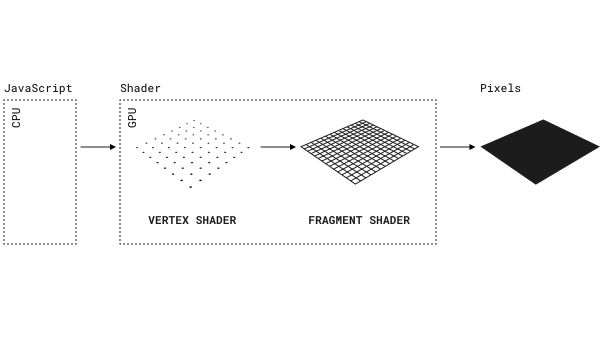
The pipeline that transforms three.js code to pixels:
A shader has two parts, a vertex and fragment shader. They work like this:

three.js materials, like MeshBasicMaterial, produce a shader with preset values. However, we can define our own shaders using a speical material — ShaderMaterial — for more control and creativity.


The vertex shader is executed for each vertex in the geometry. It's purpose is to set gl_Position — the vertex's position in clip space.
position, modelViewMatrix, and projectionMatrix.position represents the vertex coordinates in the mesh's local space.modelViewMatrix transforms local coordinates to world coordinates — coordinates relative to the scene's coordinate system.modelViewMatrix also transforms world space to camera space — space relative to the camera's position and orientation.projectionMatrix converts camera space to clip space - used by the GPU to determine what is visible on screen.Shaders are written in a C-like language called GLSL (OpenGL Shading Language). A data type commonly used is vectors — similar to JavaScript arrays.
vec2 myVec = vec2(1.0, 0.5) is like const myVec = [1.0, 0.5], vec3 myVec = vec3(1.0, 0.5, 1.0) is like const myVec = [1.0, 0.5, 1.0], ...myVec.x or myVec.y which is like myVec[0] or myVec[1]vec2 myVec = vec2(0.0), which is the same as vec2 myVec = vec2(0.0, 0.0)UV is a 2D coordinate system used for the surface of the geometry. Similar to the XY coordinate system except all values are normalized (between 0 and 1). In the vertex shader, the UV coords of the current vertex are passed in by three.js.
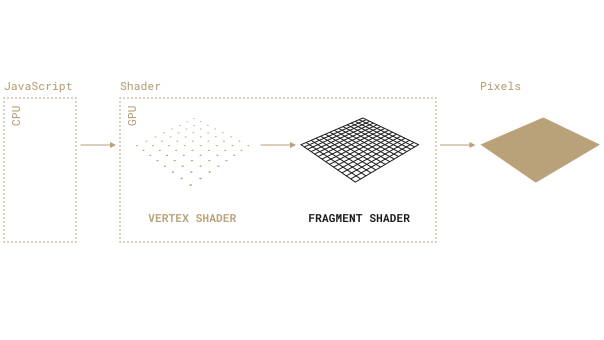
The fragment shader is executed for each fragment. It's purpose is to set gl_FragColor — the fragment's color. It accepts a normalized RGBA value.
<tonemapping_fragment> and <colorspace_fragment> injects code that ensures colors and lighting render correctly.
Matching how other three.js materials like MeshStandardMaterial work internally.
three.js sends UV coords to the vertex shader, but not the fragment shader.
Therefore, to access the current fragment's UV coords, they need to be sent from the vertex to the fragment shader.
Variable labeled vUv by convention.
See shaders 102 - sending data for more details.
const material = new THREE.ShaderMaterial({vertexShader: `varying vec2 vUv;void main() {...vUv = uv;}`,fragmentShader: `varying vec2 vUv;void main() {...});
In addition to providing low-level control, shaders are also performant. JavaScript runs on a CPU thread using sequential processing. Capable of doing one task at a time, like rendering one pixel at a time. Shader code runs on the GPU using parallel processing. Capable of doing many tasks at once, like rendering all pixels at once. The GPU also has hardware accelerated angle, trigonometric and exponential functions — functions used to create shader effects.
Their weakness is code complexity.
Shaders are written in native WebGL, which is low-level and verbose.
Also, the only output is color.
We don't have access to tools like console.log for debugging.
Have any feedback about this note or just want to comment on the state of the economy?


