


Planted:
Status: decay
Intended Audience: Creative coders, Front-end developers
How to send data to a WebGL shader and between the vertex and fragment shader.
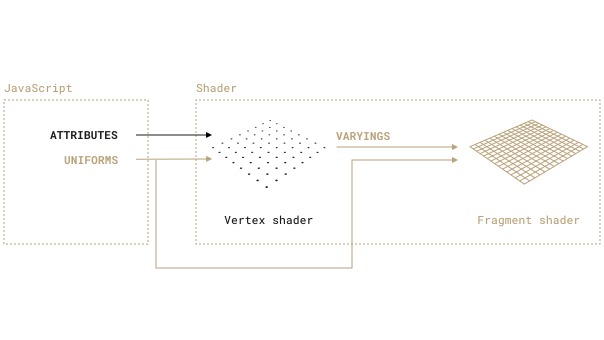
Purpose: to send unique data to each vertex.
Convention: prefix variable name with 'a' (example: aMyAttribute).
How: store the data in a buffer using BufferAttribute(<array>, <itemSize>) and send using the geometry's setAttribute method.
<itemSize> is the number of items you want to send per vertex.<array> should be <itemSize> multiplied by number of vertices.geometry.setAttribute("aMyAttribute", new THREE.BufferAttribute(values, 1))
Then access the value within the shader using keyword in:
in float aMyAttribute;...
Example: send a random value to each vertex to change z-position. Creating a terrain-like surface:
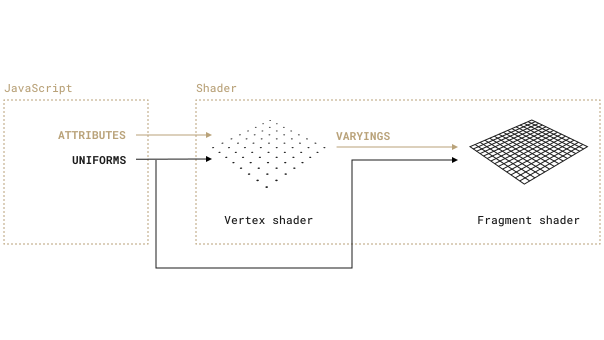
Purpose: to send the same data to all vertices and fragments.
Convention: prefix variable name with 'u' (example: uMyUniform).
How: use the material's uniforms property.
// set initial valueconst material = new THREE.ShaderMaterial({uniforms: {uMyUniform: {value: ...}},...// change valuematerial.uniforms.uMyUniform.value = ...;
Example: set the same color for all fragments:
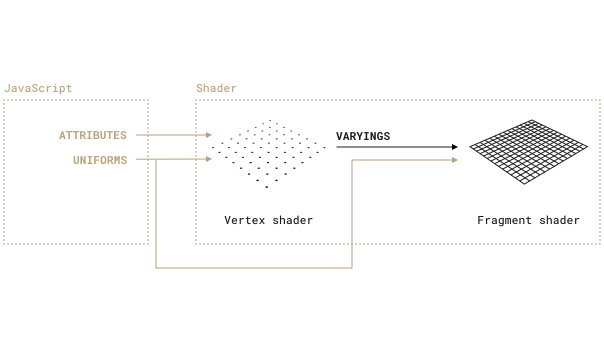
Purpose: to send data from the vertex shader to the fragment shader.
Useful if a primitive, like a triangle, has two vertices with different data, the fragment shader will smoothly interpolate the data across the surface.
For example, if a triangle has one red and two blue vertices, the surface will be a red to blue gradient.
Convention: prefix variable name with 'v' (example: vMyVarying).
How: declare a varying variable in the vertex shader (keyword: out) and fragment shader (keyword: in).
Set its value in the vertex shader and read it in the fragment shader.
out float vMyVarying;void main() {...vMyVarying = ...}
in float vMyVarying;void main() {gl_FragColor = vec4(vec3(vMyVarying), 1.0);}
Example: set each vertex color depending on its z-position. The lower, the more black, the higher the more white:
Shaders don't provide many debugging tools (like console.log).
To inspect data we can use grayscale color.
First, normalize the data, then send it to the fragment shader and use as the color.
This is used in the Pointer Position example below.
To send the pointer (mouse or touch) position to a shader, we can use a Raycaster to detect if the pointer intersects the mesh.
If intersecting, convert the coordinates and send as a uniform:
const raycaster = new THREE.Raycaster()const pointer = new THREE.Vector2()function onPointerMove(event) {// Convert screen coords to clip-space coords (go from -1 to +1, left to right, top to bottom)pointer.x = (event.clientX / sizes.width) * 2 - 1pointer.y = (-event.clientY / sizes.height) * 2 + 1// Update the ray with a new origin and direction.raycaster.setFromCamera(pointer, camera)const intersections = raycaster.intersectObjects(scene.children)if (intersections.length) {const intersection = intersections[0]material.uniforms.uUvPointer.value = intersection.uv}}
To confirm the data is correct in the shader, I'm using the distance(...).
It calculates the distance between two vec2 positions.
The first is the position of the current vertex the shader is processing (uv).
The second is the mouse position (uUvPointer).
Using 1.0 - distance(uv, uUvPointer) will return returns a higher value the smaller the distance.
We then use this value for color to render a gradient radiating from the pointer.
Have any feedback about this note or just want to comment on the state of the economy?


