

Planted:
Status: decay
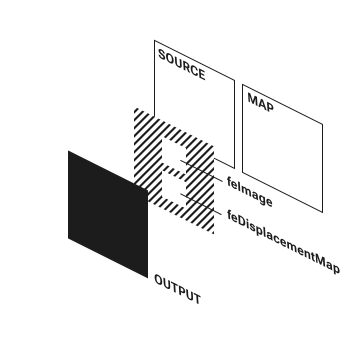
<feDisplacementMap> is a SVG filter primitive.
It distorts an input (the source) to take the shape of a 2nd input (the map).
If your unfamiliar with SVG filters, you can find a note explaining the fundamentals here.
The primitive takes 2 inputs:
in (source) andin2 (map).The source asset can passed straight to the in attribute.
The map asset 1st needs to be captured using the <feImage>.
The result can then be passed to the in2 attribute.

The <feImage> primitive is used to load the asset used as the map.
When using this primitive, normally we would use the asset's URL as the value of the href attribute. For example:
<feImage href="https://garden.bradwoods.io/images/towel.png" ... />.
Due to security concerns, if:
<feImage> is being used as the map for <feDisplacementMap>, we have to use a different approach.One solution is to use a blob (used in the example above):
href value of <feImage>.const myFeImage = document.querySelector('feImage');const url = feImage.getAttribute('href');fetch(url).then((response) => response.blob()).then((blob) => {const objURL = URL.createObjectURL(blob);myFeImage.setAttribute('href', objURL);});
Another solution is to use a data URL (used in examples below). This can be used when you have defined an SVG image in the DOM that you want to use as the map:
<svg> element,<feImage> element &href value of <feImage>.const uRIComponent = document.getElementById('myMapSvgAsset').outerHTML;const encodedURI = encodeURIComponent(uRIComponent);const myFeImage = document.querySelector('feImage');// A URL encoded fragment has to be an SVG Element with a namespace attribute.myFeImage.setAttribute(`href`, `data:image/svg+xml;charset=utf-8,${encodedURI}`);

<feDisplacementMap> has the following attributes:
scale: defines the strength and direction of the distortion.xChannelSelector: defines which of the map assets 4 color channels (red, green, blue, alpha) should be applied to distort the x-axis.yChannelSelector: defines which of the map assets 4 color channels (red, green, blue, alpha) should be applied to distort the y-axis.Irrelevant of which color channel is selected for an axis, the following applies:
Imagine we set xChannelSelector to red and the yChannelSelector to blue.
Then apply a map asset that covered the source with 1 color, rgba(127, 127, 127, 1).
This would result in no pixels moving.
If you decrease the red channel's value to rgba(51, 127, 127, 1), the output will translate to the right.
This is because:
If you increase the blue channel's value to rgba(127, 127, 204, 1), the output will translate up.
This is because:
yChannelSelector is set to blue,
The Identity Map is a special map that will scale an image equally in all directions. The color values gradually decline from a maximum at 1 edge to a minimum at the opposite edge.
rgba(255, 0, 0, 1) to rgba(255, 0, 0, 0),rgba(0, 0, 255, 1) to rgba(0, 0, 255, 0) &If you increase or decrease (negative numbers are valid) the scale value, the output will zoom in and out.
Have any feedback about this note or just want to comment on the state of the economy?


